 PassCollect
Using PassCollect on iPhone Duo — folded and unfolded layouts
Summary: PassCollect supports iPhone Duo and adapts its layout to the screen you're using. Folded, your cards sit in a compact two-column grid. Unfolded, they spread across three columns, with pinned cards at the top and the toolbar always in reach.
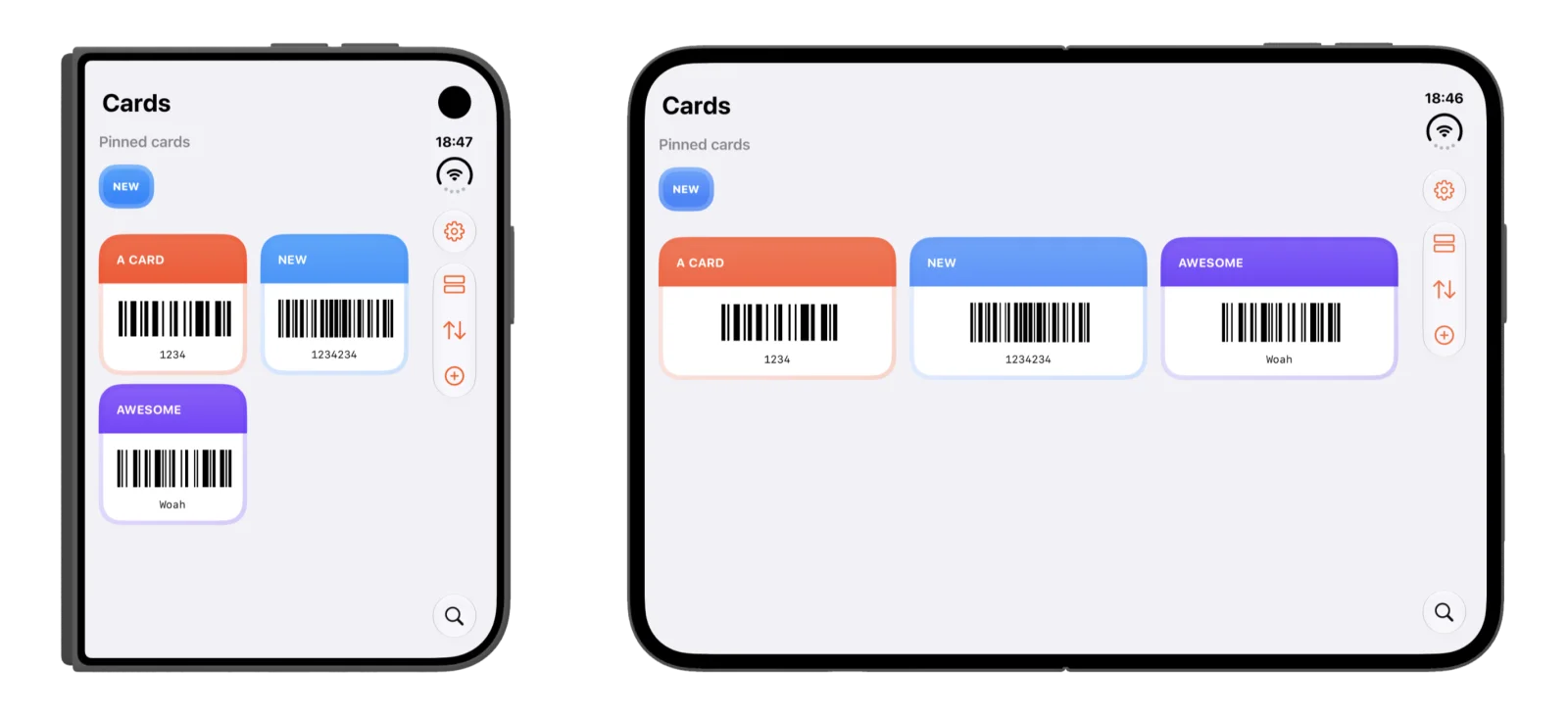
Does PassCollect support iPhone Duo?
Yes. PassCollect's layout adapts to iPhone Duo, so your cards fit the screen whether the phone is folded or unfolded.
How the layout changes
| Folded | Unfolded | |
|---|---|---|
| Card grid | Two columns | Three columns |
| Pinned cards | At the top | At the top |
| Toolbar | Along the side | Along the side |
| Search | Bottom of the toolbar | Bottom of the toolbar |
Folded
When iPhone Duo is folded, PassCollect uses a compact two-column grid. You can see several cards at once without scrolling.
Unfolded
When you unfold the phone, the same cards spread out across the wider display. With three cards per row, more of your collection fits on one screen.
Pinned cards stay on top
In both layouts, your pinned cards appear at the top of the list, so your favorites are the first thing you see whichever way you hold the phone.
The toolbar is always in reach
On iPhone Duo, PassCollect's controls sit in a toolbar along the side of the screen:
- Settings
- Layout, to switch how your cards are shown
- Sort
- Add, to save a new card (how to add a card)
- Search, at the bottom
Everything else works the same
All of PassCollect's features work on iPhone Duo too: